
Reverse image search Ever looked at a photo online and thought, “Where did this come from?” or “Is this even real?” You’re not alone. We’re living in a world where images travel faster than words, and that makes visual verification more important than ever.
That’s exactly where reverse image search comes in. Instead of typing words into a search bar, you start with a picture and let smart tools hunt down where it’s been used, who created it, and what it really shows.
What Is Reverse Image Search?
Reverse image search is a search method where you use an image as your query instead of text. You either upload a picture from your device or paste its URL, and the search engine scans the web to find:
-
Exact matches
-
Visually similar images
-
Pages where that image (or similar versions) appears
It’s like asking the internet, “Hey, what do you know about this picture?”
This is especially useful when you do not have the right words to describe what you’re seeing. Maybe you have a photo of a landmark, a product, or a random meme. Reverse image search helps you:
-
Identify what or who is in the image
-
Check where it first appeared
-
See if the image has been edited, cropped, or misused
-
Get more context than you could ever get from a simple text search
In short: when words fail, images speak—and reverse image search translates.
How Does Reverse Image Search Actually Work?
Let’s strip away the buzzwords and keep it simple.
a few things happen behind the scenes:
-
The tool analyzes the image itself
It doesn’t care about the file name like “IMG_1234.jpg”. Instead, it studies the visual content:-
Colors
-
Shapes
-
Textures
-
Edges and lines
-
Patterns and overall composition
-
-
It converts the picture into a “visual fingerprint”
Think of it as turning the image into a unique digital signature. This signature is what the system uses to compare against billions of other images in its index. -
It compares your image with its massive database
Using computer vision and machine learning, the tool scans its index to find:-
Exact matches
-
Cropped, resized, or compressed versions
-
Images that are visually similar (same scene, same face, same object)
-
-
It returns a list of results
You’ll usually see:-
Websites that contain the same or similar image
-
Visually related images
-
Possible descriptions, keywords, or related topics
-
-
The tech keeps improving over time
Because these tools use AI, they constantly learn from new data. Over time, they get better at recognizing:-
Faces
-
Objects
-
Landmarks
-
Even heavily edited or filtered images
-
That’s why reverse image search today is more accurate, faster, and more powerful than it was just a few years ago.
The Most Popular Reverse Image Search Tools
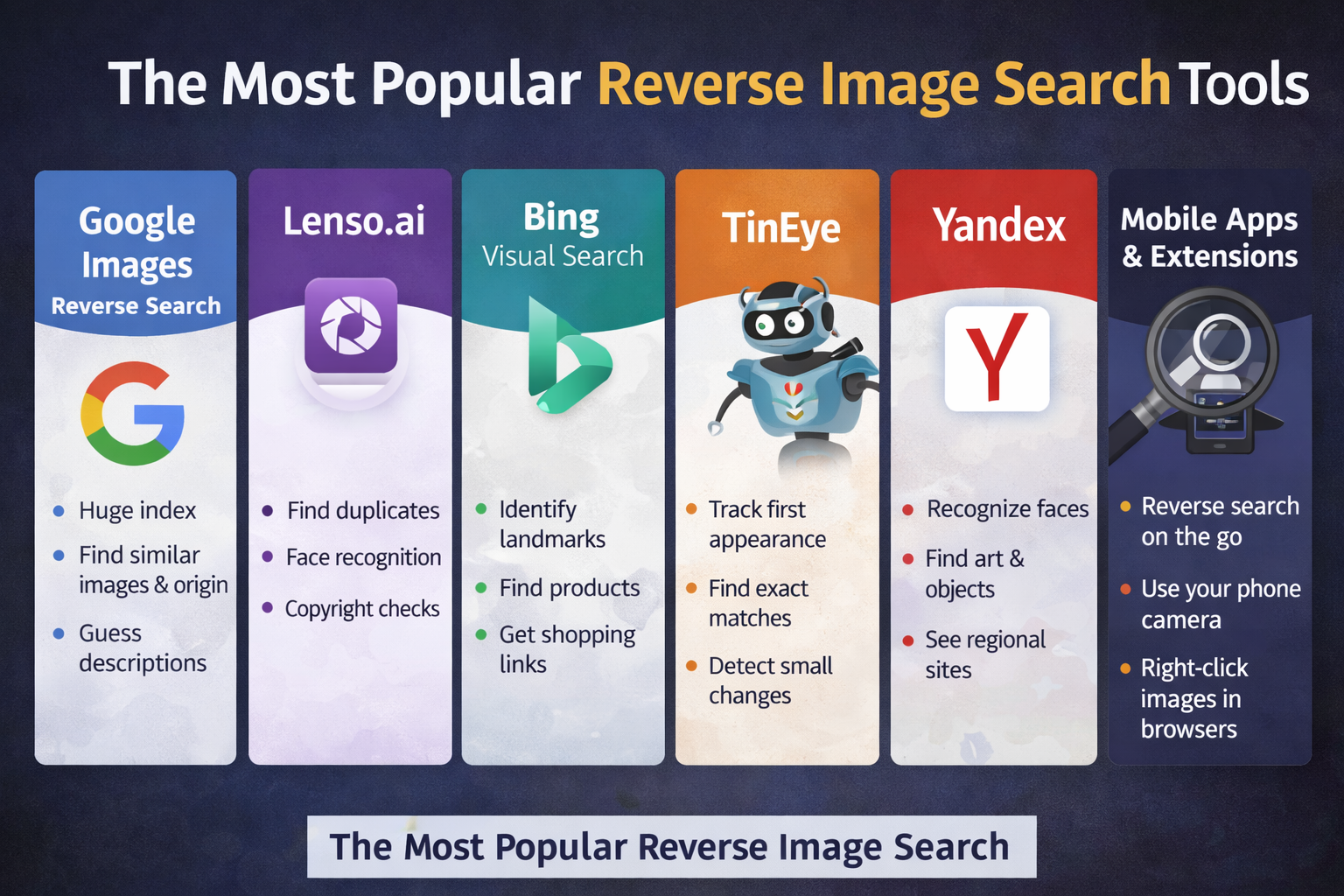
Not all tools work the same way, and each one has its own strengths. Using more than one can give you a bigger picture—literally.
1. Google Images Reverse Search
Google Images is probably the first tool most people think of.
-
You can drag and drop an image, upload from your device, or paste a URL.
-
Google then shows:
-
Visually similar images
-
Pages that use that image
-
Sometimes, a “best guess” description
-
Google’s main advantage is its huge index. Because it crawls a massive portion of the web, it’s great for:
-
Fact‑checking viral images
-
Finding higher‑resolution versions
-
Tracking where a widely shared image appears
2. Lenso.ai – Best for Face and Deep Visual Search
Lenso.ai specializes in reverse image search with an advanced facial recognition and visual matching engine.
Upload an image and you can explore categories like:
-
People
-
Duplicates (great for copyright checks)
-
Places
-
Related
-
Similar
With Lenso.ai, you can:
-
Find your old photos floating around online
-
Check where your face or photos appear on the internet
-
Detect possible copyright infringement
-
Spot potential catfish, fraud, and romance scammers
Extra useful features include:
-
Filtering results by keywords or domains
-
Sorting by newest/oldest or best/worst match
-
Creating free alerts if there are no matches yet—Lenso notifies you when new matches appear later
If you care about privacy, identity misuse, or copyright, this tool is extremely handy.
3. Bing Visual Search
Bing Visual Search focuses heavily on object recognition.
It’s especially useful if you want to:
-
Identify products (clothes, gadgets, home decor)
-
Learn more about a place or landmark
-
Get shopping links related to a product in the photo
Bing sometimes picks up small details that other tools overlook, making it a solid second opinion when Google doesn’t quite nail it.
4. TinEye Reverse Image Search
TinEye is one of the oldest specialized reverse image search engines, and it does a few things extremely well:
-
Tracks where an image first appeared
-
Finds exact or near‑exact matches even if:
-
The image is resized
-
Cropped
-
Slightly edited
-
used by:
-
Photographers
-
Designers
-
Brands
They use it to monitor where their visuals are being used and whether their rights are being respected. It also lets you see how an image has evolved over time.
5. Yandex Reverse Image Search
Yandex is a major Russian search engine with a strong reverse image search feature.
It’s particularly good at:
-
Facial recognition
-
Object and artwork recognition
-
Surfacing results from regions and sites that Western engines sometimes miss
If you’re trying to track down a person, artwork, or obscure location and Google isn’t helping, Yandex is often the missing piece.
6. Mobile Apps & Browser Extensions
You don’t always need to go to a website manually.
-
Mobile apps: Many camera and gallery apps (and Google Lens) let you long‑press or tap an icon to “search this image”. Perfect when you’re out, see something interesting, and want instant info.
-
Browser extensions: Add‑ons for Chrome, Firefox, Edge and others allow you to right‑click any image and run a reverse search instantly. No downloads, no manual uploads—just one click.
If you search images regularly, these tools can save you a lot of time.
How To Do A Reverse Image Search (Step‑By‑Step)
The exact steps vary slightly by tool, but the basic process is the same.
-
Choose your tool
For most users, starting with Google Images, Bing, Lenso.ai, or TinEye is enough. -
Upload your image or paste the URL
-
Click the camera icon (on Google Images and others)
-
Select:
-
“Upload an image” from your device, or
-
“Paste image URL” if the picture is already online
-
-
-
Let the tool analyze the picture
You just wait a moment while the system processes the image and compares it to its database. -
Review the results
You’ll usually see:-
Exact matches
-
Similar looks
-
Related pages and topics
-
-
Explore the sources
Click through to:-
Find the original source
-
Check context (articles, captions, comments)
-
Understand how the image is being used
-
-
Repeat on other tools if needed
No single reverse image tool has the entire web. If the image is important, use multiple services for a more complete view.
Reverse Image Search On Social Platforms
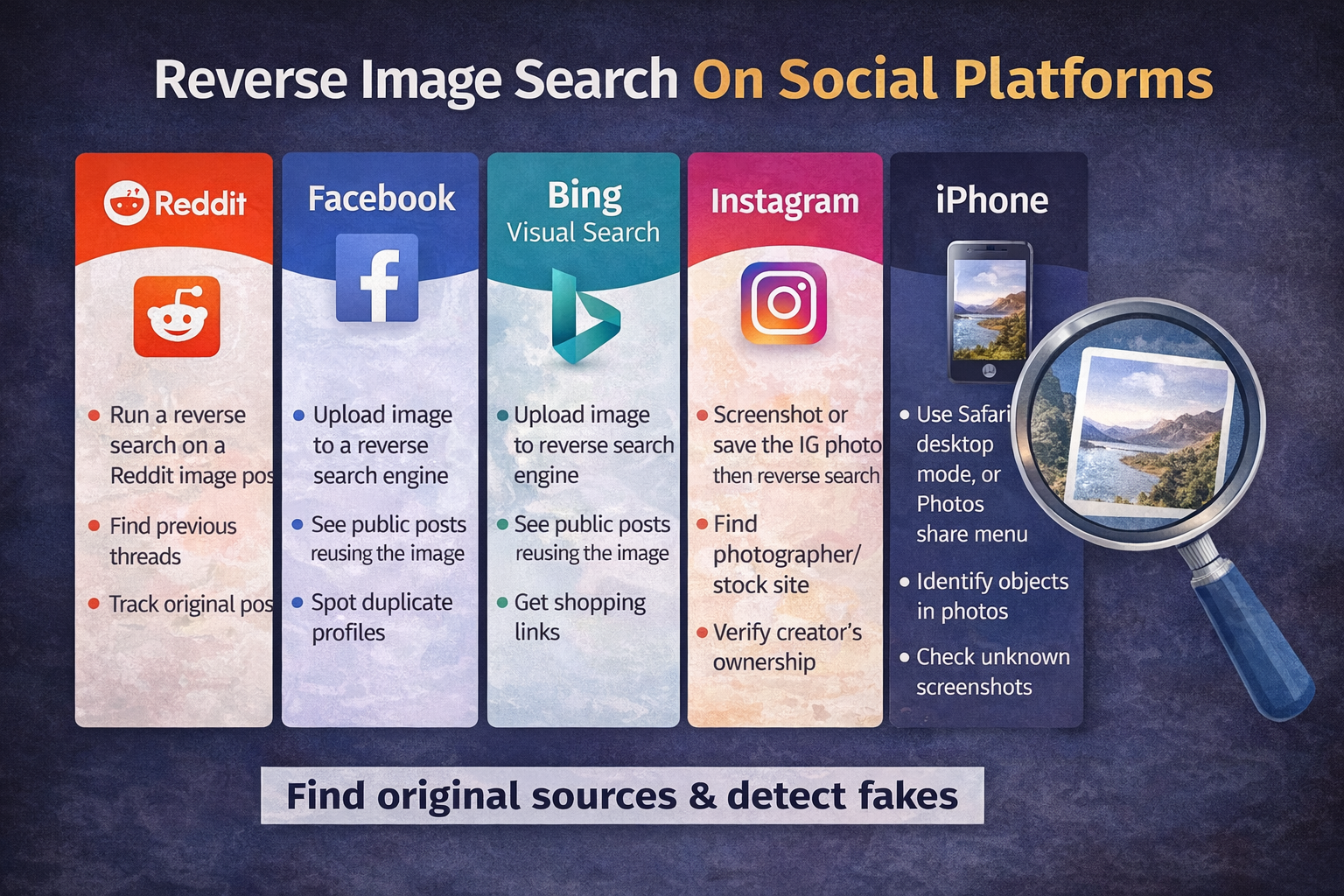
Social networks are flooded with photos—memes, selfies, screenshots, travel snaps. Reverse image search can help you cut through the noise.
Reddit Reverse Image Search
Reddit is full of reposts, edits, and meme variations.
By running a reverse search on an image posted to Reddit, you can:
-
Find previous threads where the same image was discussed
-
Track down the original post or source
-
Get additional context from comments and community insights
This is great for fact‑checking or finding the backstory of a viral photo.
Facebook Reverse Image Search
Facebook doesn’t provide a built‑in reverse image search feature.
However, you can:
-
Save the image or copy its URL
-
Upload it to a tool like Google Images, Lenso.ai, or TinEye
From there, you might see:
-
Public posts or pages using the same image
-
Profiles or sites reusing the picture
This can help with:
-
Identity verification
-
Detecting reused or stolen profile photos
-
Spotting suspicious or duplicated accounts
Instagram Reverse Image Search
Instagram also doesn’t support native image‑based searching.
But again, your workaround is simple:
-
Screenshot or save the Instagram image
-
Upload it to a reverse image search engine
You can often:
-
Find whether the photo came from a stock site or photographer
-
Check if it’s been reposted without credit
-
Verify if the account truly owns the original content
This is especially useful in niches like travel, fashion, or lifestyle, where reposted content is common.
iPhone Reverse Image Search
On an iPhone, reverse image search is easier than most people think:
-
Via Safari (desktop mode)
-
Open Safari
-
Go to Google Images
-
Tap the “Aa” icon and request the desktop site
-
Tap the camera icon to upload a photo from your gallery
-
-
Via the Photos app + share menu
Some apps or integrated tools let you send an image directly from Photos to a search app (like Google or Chrome) and run a visual search.
This helps you quickly:
-
Identify objects in your photos
-
Verify screenshots
-
Track where a picture came from
Face Reverse Image Search
Face‑based reverse image search is powerful—and sensitive.
By uploading a headshot to a search tool that supports facial recognition, you may:
-
Find similar photos of the same person
-
Discover public profiles where that face appears
-
Check if someone is using your photo without permission
This is useful for:
-
Detecting fake or cloned profiles
-
Checking online reputation
-
Verifying identities in suspicious situations
Always use face search responsibly and respect privacy and local laws.
AI‑Powered Reverse Image Search
Modern reverse image search relies heavily on AI.
AI models analyze:
-
Shapes
-
Colors
-
Patterns
-
Context in the image (objects, scenes, people, text)
Compared to older methods, AI‑powered search can:
-
Recognize objects even if the photo is dark, blurry, or partially cropped
-
Detect edited or filtered images
-
Suggest relevant labels (e.g., “Eiffel Tower at night”, “golden retriever dog”)
This leads to smarter, more accurate matches, especially for complex scenes.
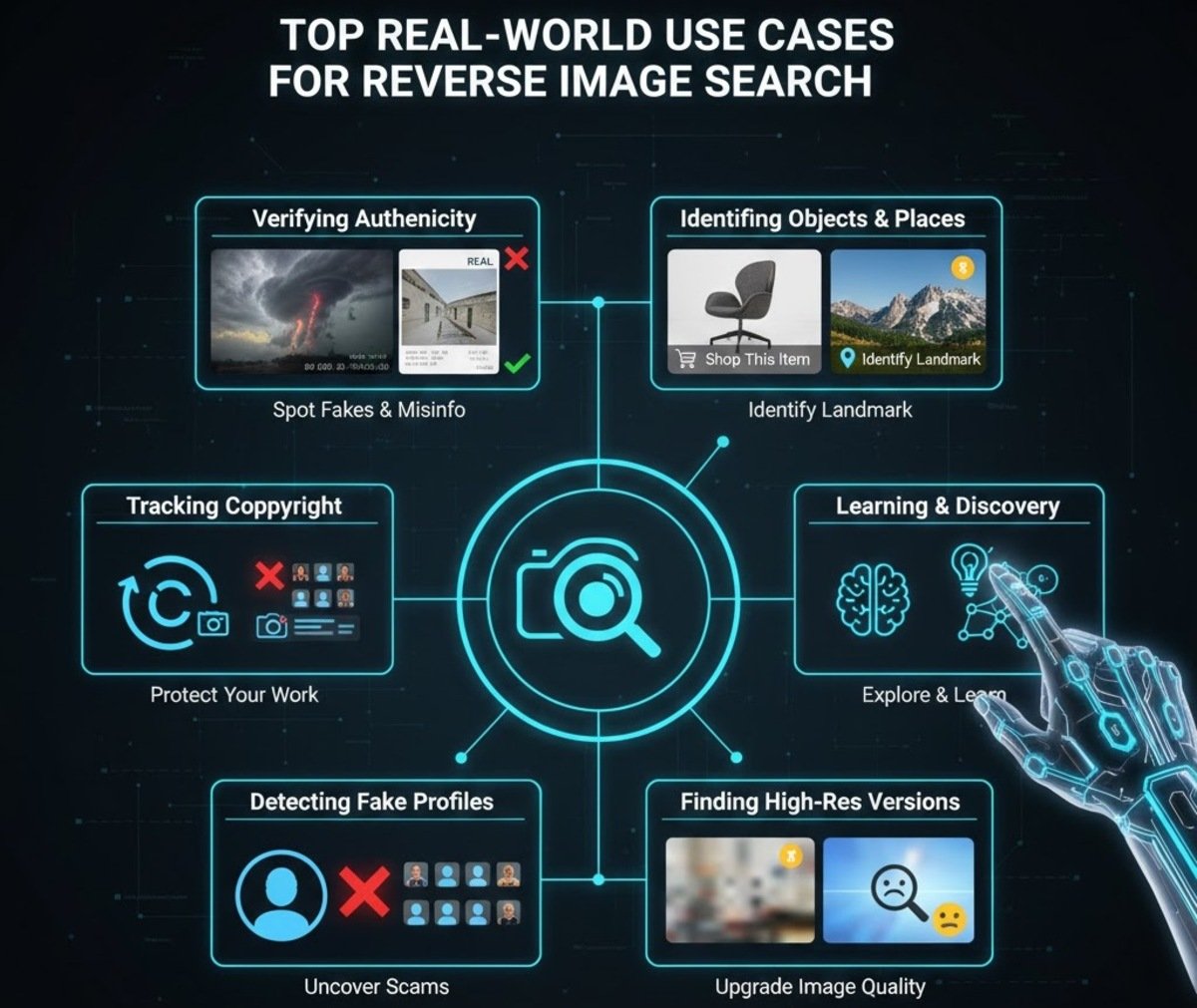
Top Real‑World Use Cases For Reverse Image Search
Reverse image search isn’t just a geeky trick. It solves real problems every day.
1. Verifying Authenticity Of Photos
We’ve all seen dramatic images go viral—storms, disasters, celebrity scandals. Many of them are old, edited, or completely fake.
Reverse image search lets you:
-
See when a picture first appeared
-
Check if the same image was used in a different context years ago
-
Spot obvious edits, composites, and Photoshop tricks
This is crucial for:
-
Journalists and researchers
-
Social media users trying to avoid misinformation
-
Anyone who wants to know whether a viral photo is legit
2. Tracking Copyright And Image Ownership
If you create content, reverse image search is your friend.
Photographers, illustrators, brands, and bloggers use it to:
-
Find websites using their images without credit or permission
-
Discover unauthorized commercial use
-
Gather evidence for DMCA takedown requests or legal action
It’s like having a radar on your images across the web.
3. Identifying Objects, Products, And Places
Ever seen a photo of a cool chair, a jacket, or a breathtaking location and thought, “What is that?” Reverse image search can often answer that.
You can:
-
Upload a product photo and find:
-
Online stores
-
Reviews
-
Alternative sellers
-
-
Upload a skyline or landmark and identify the city or location
-
Upload a plant, animal, or artwork and get more information
It’s basically a visual shortcut to product discovery and learning.
4. Finding Higher‑Resolution Or Original Versions
Low‑quality screenshots and compressed images are everywhere.
Reverse image search can help you:
-
Track down the original, higher‑resolution version
-
Replace blurry images in presentations, reports, or blog posts
-
Find uncropped versions that reveal more details
For designers, marketers, and content creators, this is a huge time saver.
5. Detecting Fake Profiles And Online Scams
Scammers love stealing profile pictures from real people.
If you suspect a fake account:
-
Download the profile photo
-
Run a reverse image search
If the same face appears on multiple unrelated profiles, dating sites, or foreign pages, that’s a big red flag.
This is helpful on:
-
Dating apps
-
Social media
-
Classifieds and marketplaces
Reverse image search gives you a simple way to check if you’re being catfished.
Advanced Tips And Best Practices
Want better, more accurate results? A few simple tweaks go a long way.
-
Use clear images
Blurry or pixelated pictures make matching harder, especially for faces and fine details. -
Crop before you upload
Focus on the main subject. Remove backgrounds or unrelated objects so the tool doesn’t get confused. -
Try multiple tools
No search engine sees the entire internet. For important cases, use Google, Bing, Lenso.ai, TinEye, and Yandex. -
Experiment with both upload and URL
Sometimes uploading a local file works better than using a compressed web version. -
Save important discoveries
Bookmark key sources, save screenshots, or export results if a case might matter later (legal, professional, or personal reasons).
Limitations
As powerful as it is, reverse image search isn’t magic.
Here’s where it can fall short:
-
Not all images are indexed
If a photo lives only in private chats, closed apps, or unindexed websites, search engines won’t see it. -
Heavily edited images may slip through
If the image is heavily filtered, face‑swapped, or combined with others, matches can be incomplete. -
Very new uploads may not show
If something was just posted, it may take time before it appears in search results. -
Private and locked profiles are invisible
Content behind privacy controls, paywalls, or closed platforms usually won’t appear. -
Low‑quality images reduce accuracy
Grainy screenshots or tiny avatars are harder to analyze accurately.
Understanding these limits helps you use reverse image search realistically and avoid over‑relying on it.
Future
The tech behind reverse image search is evolving fast, and the future looks even more visual.
Here’s what’s coming:
-
Deeper understanding of context
Tools won’t just recognize “a person” or “a street”; they’ll understand scenarios, actions, and relationships between objects in the image. -
Better detection of edited content
AI will get better at spotting manipulations—filters, deepfakes, composites—and showing how an image changed over time. -
Stronger integration with mobile and AR
You’ll point your phone at something and instantly see:-
Where to buy it
-
What it is
-
Related videos, reviews, or news
-
-
More privacy‑aware features
As laws and awareness grow, we can expect clearer controls around facial recognition, data storage, and consent.
Overall, we’re heading toward a world where “searching by sight” is just as normal as typing a query.
Conclusion
one of those tools that feels almost like a cheat code once you start using it properly.
With just a single picture, you can:
-
Uncover its origin
-
Check if it’s fake, edited, or taken out of context
-
Protect your creative work
-
Identify products, places, and faces
-
Stay safer from scams and catfishing
From Google Images and Bing Visual Search to specialized tools like Lenso.ai and TinEye, you now have a full toolbox for investigating almost any image you come across.
Used thoughtfully, reverse image search turns every picture into a story you can verify, understand, and trust.